
-
×
 BLDC Motor A2212 1400Kv
1 × ₹355.00
BLDC Motor A2212 1400Kv
1 × ₹355.00
Subtotal: ₹355.00

Out of stock
The APM 2.8 flight controller is a versatile and open-source autopilot system designed for various unmanned aerial and ground vehicles. Here’s a quick overview:
Key Features
Built-in Compass: Integrated compass for improved directional accuracy.
Processor: ATmega2560 (main microcontroller) and ATmega32U2 (USB connectivity).
Sensors: MPU-6000 6 DoF Accelerometer/Gyro, MS5611-01BA03 barometric pressure sensor.
Memory: 4 MegaByte Dataflash chip for automatic data logging.
Power: Supports external power modules for voltage and current monitoring.
Flight Modes: Manual, Stabilize, Altitude Hold, Loiter, Return to Launch (RTL), Auto (Waypoint Navigation), and more.
Connectivity: USB for programming, telemetry port for real-time data monitoring, and PWM outputs for motor control.
Applications
Multirotors: Ideal for quadcopters, hexacopters, and other multirotor configurations.
Fixed-Wing Planes: Suitable for fixed-wing aircraft.
Rovers: Can be used for ground vehicles.
Autonomous Missions: Capable of executing complex missions with waypoints
₹4,000.00 exc. GST
Out of stock
The APM 2.8 flight controller is a versatile and highly capable open-source autopilot system designed for various unmanned aerial and ground vehicles. Here’s a detailed overview of its features, setup, and applications:
Key Features
Built-in Compass: Integrated compass for improved directional accuracy, eliminating the need for an external compass module.
Microcontrollers: Uses ATmega2560 as the primary microcontroller and ATmega32U2 for USB connectivity.
Sensors:
MPU-6000: A 6 DoF (Degrees of Freedom) accelerometer/gyro for stable flight performance.
MS5611-01BA03: A barometric pressure sensor for altitude measurement.
Memory: Equipped with a 4 MegaByte Dataflash chip for automatic data logging.
Power Module Support: Compatible with external power modules for voltage and current monitoring, providing reliable power management.
Firmware: Supports the ArduPilot firmware, which can be customized and upgraded according to specific project needs.
Specifications
Microcontrollers ATmega2560 (main) and ATmega32U2 (USB)
Sensors MPU-6000 accelerometer/gyro, MS5611 barometer
Compass Built-in
Memory 4MB Dataflash for logging
Power Supply Supports external power modules
Connectivity USB, telemetry port, PWM outputs
Flight Modes Manual, Stabilize, Altitude Hold, Loiter, RTL, Auto (Waypoint Navigation), and more
Applications
Multirotors:
Ideal for quadcopters, hexacopters, and other multirotor configurations.
Provides stable flight control with various flight modes and GPS integration.
Fixed-Wing Aircraft:
Suitable for fixed-wing planes, offering features such as auto-takeoff and landing, waypoint navigation, and stabilization.
Rovers:
Can be used for ground vehicles, providing autonomous navigation, obstacle avoidance, and precise control.
Autonomous Missions:
Capable of executing complex missions with waypoints, including survey missions, search and rescue operations, and agricultural monitoring.
Setup and Usage
Connecting Components:
Connect the APM 2.8 to your drone or vehicle’s frame.
Attach sensors, GPS module, power module, and other necessary components.
Powering Up:
Ensure the power module is properly connected to provide stable power.
Connect the flight controller to your computer via USB for configuration.
Firmware Installation:
Use the Mission Planner software to install and configure the ArduPilot firmware.
Follow the prompts to load the appropriate firmware for your specific vehicle type.
Calibration:
Calibrate the accelerometer, compass, and other sensors using the Mission Planner software.
Ensure accurate sensor readings for stable and reliable flight performance.
Configuring Flight Modes:
Set up various flight modes (e.g., Stabilize, Altitude Hold, Loiter) based on your preferences.
Assign flight modes to specific switches on your transmitter for easy access.
Pre-flight Checks:
Perform pre-flight checks to ensure all components are functioning correctly.
Verify GPS lock, sensor readings, and battery levels before takeoff.
Safety Precautions
Avoid Overheating: Be cautious when soldering connections to prevent overheating and damaging the components.
Proper Handling: Handle the flight controller and components with care to avoid physical damage.
Secure Connections: Ensure all connections are secure and insulated to prevent short circuits and signal loss.
Firmware Updates: Regularly update the firmware to benefit from the latest features and improvements.
The APM 2.8 flight controller is a robust and versatile autopilot system that supports a wide range of vehicles and applications. Its built-in compass, comprehensive sensor suite, and open-source firmware make it an excellent choice for both hobbyists and professionals looking to build or upgrade their unmanned systems.

High Fly brand presents 11.1V 2200mAh capacity premium quality lipo batteries. As the name suggest it delivers high-performance and is specially designed for drones, RC vehicles, and robotics applications.
Light in weight and compact in size, with a 35C discharge rate, it delivers stable and efficient power, ensuring high responsiveness and reliability. Built with premium-grade cells, offering enhanced durability, low internal resistance, and extended cycle life.
Equipped with high-quality XT60 connectors for secure, low-resistance connections, ensuring minimal power loss. Features durable, high-purity silicon wires for efficient current flow and superior flexibility, reducing overheating risks. Engineered for consistent performance in high-demand applications, making it a trusted choice for professionals and enthusiasts.

High Fly brand presents 11.1V 3700mAh capacity premium quality lipo batteries. As the name suggest it delivers high-performance and is specially designed for drones, RC vehicles, and robotics applications.
Light in weight and compact in size, with a 35C discharge rate, it delivers stable and efficient power, ensuring high responsiveness and reliability. Built with premium-grade cells, offering enhanced durability, low internal resistance, and extended cycle life.
Equipped with high-quality XT60 connectors for secure, low-resistance connections, ensuring minimal power loss. Features durable, high-purity silicon wires for efficient current flow and superior flexibility, reducing overheating risks. Engineered for consistent performance in high-demand applications, making it a trusted choice for professionals and enthusiasts.
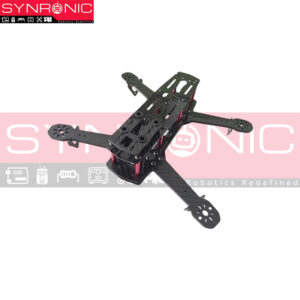
The Q250 carbon fiber frame is a durable and lightweight option for FPV racing and aerial photography drones:
Here are it`s key features:
Material: High-quality carbon fiber
Wheelbase: 250 mm
Weight: Approximately 160 g
Arm Thickness: 4 mm
Camera Mounting: Vibration-free bracket
Color-Coded Arms: For easy orientation
Applications
FPV Racing
Video Recording
Educational Projects
DIY Hobby Projects
There are no reviews yet.